
release · July 27, 2026
Keychain 3.0.1 with new macOS Confirm, Immediate, and Refined GnuPG Scope
Keychain 3.0.1 is now available. This first update to Keychain 3 focuses on three areas: completing the zero-dependency macOS experience for --confirm, adding a new --immediate mode for automatic shell startup, and drawing a clearer security and lifecycle boundary around GnuPG support.
Native SSH Confirmation on macOS
OpenSSH has a useful security feature that is easy to miss. When a key is loaded with ssh-add -c, the agent requires you to approve each use of that key. In Keychain, you enable this behavior with --confirm:
$ keychain add --confirm id_ed25519The key is still decrypted and held by your long-running ssh-agent, but having access to the agent socket is no longer sufficient to use it silently. When ssh, scp, Git or another program asks the agent to sign something with that key, OpenSSH invokes an askpass helper and waits for an explicit Allow or Deny response.
On Linux desktops, this normally works because an installed ssh-askpass helper can use the DISPLAY or WAYLAND_DISPLAY environment inherited by ssh-agent when it starts. macOS presents a more difficult situation: it includes neither an askpass helper nor the X11 or Wayland display environment OpenSSH traditionally expects. The established workaround was to install XQuartz, add a separate ssh-askpass program, and place it where Apple's OpenSSH expected to find it. It worked, but it was far too much machinery for a simple confirmation dialog.
Keychain 3 replaces that setup with a zero-dependency, confirmation-only helper built from facilities already included with macOS. When OpenSSH needs approval, Keychain's helper displays a native Keychain SSH Confirmation dialog. Choosing Allow approves that one operation. Choosing Deny, closing the dialog, cancelling it or encountering any helper failure refuses the operation. Here's how it looks in action:
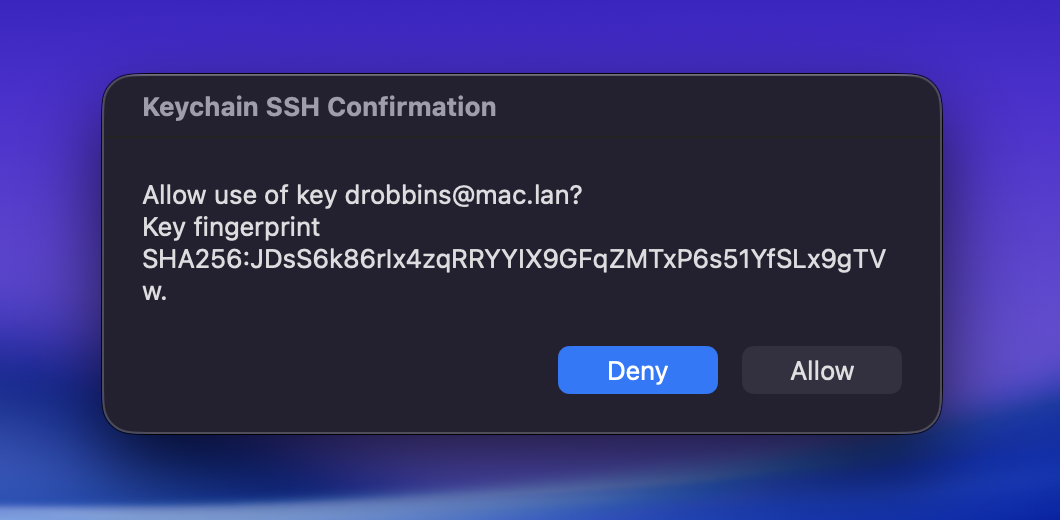
Keychain 3.0.1 completes this integration by now automatically applying --no-inherit when --confirm is used. This ensures that Keychain uses its own managed ssh-agent instead of adopting an inherited default system agent that cannot display the dialog.
You can also make confirmation a persistent preference in ~/.keychainrc:
[agent]
confirm = true
There is no XQuartz dependency, no graphical toolkit to install and no separate askpass package to configure. To use the feature, install 3.0.1 and be sure to restart your agent (run keychain agent stop, then source your shell startup script with --confirm enabled) to initialize it properly.
Immediate Activation
Keychain 3 normally handles several terminals starting at once through coordinated initialization. When a requested key is missing, each terminal displays Press Enter to initialize keys. You choose a visible terminal, press Enter there, and that terminal runs ssh-add while the others wait for the result.
That is a good, modern default when loading encrypted keys that require a passphrase to be entered. But in some use cases, the simpler approach of just having a passphrase prompt appear (like in 2.x) may be preferred. Keychain 3.0.1 adds --immediate for this use case:
$ eval "$(keychain add --eval --quiet --immediate id_ed25519)"This can be enabled persistently in ~/.keychainrc:
[agent]
immediate = true
With --immediate, if an encrypted key needs a passphrase, the prompt appears in the terminal that happens to start first. If you are starting multiple terminals simultaneously, this technically creates a (safe but nondeterministic) "race", and the terminal that "wins" may vary. Any terminals starting up simultaneously that do not win the race will wait for the first terminal to complete its initialization.
The interactive "press Enter" behavior remains the default. --immediate is an explicit choice for users who prefer automatic activation and whose Keychain workflows do not require flexible, multi-terminal startup. In all cases, Keychain uses its internal locks and coordination to ensure that one Keychain process does not clobber another.
GnuPG Scope Adjustment
Keychain 3.0.1 also includes an important change: support for using gpg-agent as a drop-in replacement for ssh-agent has been removed.
While this may seem counterintuitive, this decision was made to improve security. When loading an encrypted SSH key with this feature enabled, ssh-add, invoked by Keychain, prompted for the key's original passphrase. If the key was not already present in GnuPG's private-key store, GnuPG then requested a new passphrase through Pinentry and stored a persistent copy on disk. A user unfamiliar with this behavior who simply wanted to use gpg-agent in place of ssh-agent may not have understood why GnuPG was requesting another passphrase, and not realize that this new passphrase would be used to re-encrypt their private key in GnuPG's on-disk persistent key store, thus duplicating it.
Even more unfortunate, the GnuPG passphrase request for the re-encryption happens right after the user supplied a passphrase for decryption, not as a separate flow, adding to the potential confusion. It's very possible that the user might hit Enter and submit an empty passphrase for the second unexpected prompt, potentially leaving the imported GnuPG copy without passphrase protection on disk.
The conclusion I came to is that GnuPG's ssh-agent protocol compatibility functions are more of an SSH private key importer and bridge which exclusively uses GnuPG's own key store, rather than a drop-in replacement for ssh-agent, so we shouldn't treat it as if it is one. While I could instead have tried to smooth over the rough edges with GnuPG, I would be fighting against GnuPG's intended architecture too much. It is better to define a clear boundary around what it makes sense for Keychain to support.
Keychain will continue to support gpgs:, gpge:, and gpga: for proving and warming native GPG signing and decryption capabilities. You can still use keychain wipe --gpg to flush GnuPG's in-memory secret cache. This remains supported and does not remove persistent key material. Keychain will invoke GnuPG for those operations, but it will no longer start, configure, adopt or otherwise manage the gpg-agent lifecycle. Consider Keychain an orchestrator of ssh-agent's lifecycle and a helpful utility for GnuPG key warming, but no longer responsible for gpg-agent's lifecycle.
This gives Keychain a clear boundary:
- Keychain manages
ssh-agentand SSH keys. - Keychain supports warming native GPG signing and decryption capabilities.
- GnuPG remains responsible for
gpg-agent, Pinentry, configuration and lifecycle. gpg-agentis not supported as a substitute forssh-agent.
Upgrading will not remove any SSH private keys that were previously imported into GnuPG's persistent key store. Users who previously enabled this behavior should review their GnuPG key storage separately. You can do this by looking in ~/.gnupg/sshcontrol for imported keygrips (40-character hexadecimal values), and then looking for equivalent ~/.gnupg/private-keys-v1.d/<keygrip>.key files.
If the following command lists any keys with C in the protection field, the key is not protected with a passphrase:
$ gpg-connect-agent 'KEYINFO --ssh-list --ssh-fpr=sha256' /byeIt is recommended that you remove these keys with gpg-connect-agent "DELETE_KEY <keygrip>" /bye and then remove the corresponding entry from ~/.gnupg/sshcontrol, taking care not to delete private keys associated with a native OpenPGP key.
Get Keychain 3.0.1
Download keychain-3.0.1.pyz and its SHA256 checksum from the Keychain 3.0.1 release page. You can run the .pyz directly or install it under the familiar keychain name:
$ chmod +x keychain-3.0.1.pyz
$ sudo install -m 755 keychain-3.0.1.pyz /usr/local/bin/keychain
$ keychain inspect
Keychain 3.0.1 also corrects terminal output when GPG warming is cancelled and improves keychain man pager detection and color handling. Please report any problems on the GitHub issue tracker.