
release · June 24, 2026
Keychain 3.0.0_beta2 with Enhanced User Experience
Keychain 3.0.0_beta2 is now available, introducing an enhanced user experience for multi-terminal use. This enhancement leverages the flexibility of the Python 3 codebase to carefully manage the ssh-add invocation and implement sophisticated coordination between terminals. Notice how you now hit Enter prior to being prompted for your passphrase -- this is the new coordinated startup in action:
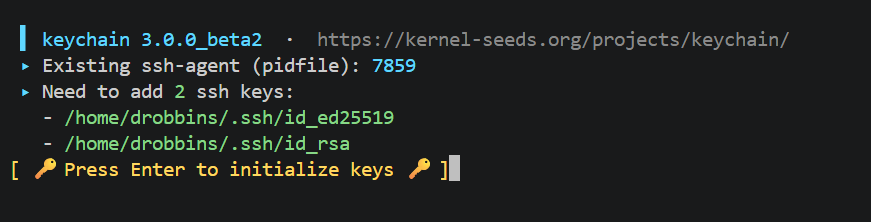
The new coordinated experience:
- All terminals cooperate: When multiple terminals detect missing SSH keys, they all display
Press Enter to initialize keys - Any terminal can initialize: Pressing Enter in any terminal runs
ssh-addin that terminal - Automatic notification: Other terminals wait automatically and are notified when initialization completes
- Seamless handoff: Waiting terminals print
Keys initialized by another terminal.and configure their environment without prompting
The implementation uses a short-lived state lock for metadata updates, a dedicated activation lock to elect the loader, and FIFO endpoints for instant kernel-level notification (no polling). A takeover mechanism allows any waiting terminal to cancel a stuck ssh-add by typing takeover, ensuring you're never blocked by a hidden or inaccessible prompt.
The Problem This Solves
The legacy Keychain behavior used a simple lock-timeout approach: when multiple terminals started simultaneously, they would race for a single lock. The winner would prompt for the passphrase; losers would timeout after 5 seconds with could not acquire lock. This worked acceptably on traditional Linux desktops where all terminals were visible -- you could see which xterm was waiting for your passphrase.
However, this model became problematic in modern workflows. When Visual Studio Code reconnects to WSL and restores multiple terminals, only one terminal tab is visible at a time. If the terminal running ssh-add was hidden behind other tabs, users had to click through each terminal to find the one prompting for the passphrase. The coordinated unlock protocol in 3.0.0_beta2 eliminates this friction entirely.
GPG Warm-Up Reliability
This release also strengthens GPG key handling. The gpge:KEYID and gpga:KEYID extended key syntax now perform a complete encrypt-then-decrypt verification cycle instead of relying on signing warm-up side effects. A tiny temporary payload is encrypted to the requested key and immediately decrypted through gpg-agent. If this verification cannot be completed, add fails rather than reporting success. This is significantly more reliable across different GnuPG versions and key configurations.
What's New
Highlights of 3.0.0_beta2:
- Coordinated multi-terminal initialization delivers a modernized unlock experience
- Quiet coordination -- eliminates
Waiting N seconds for lock...messages - Takeover mechanism for managing stuck prompts
- Reliable GPG warm-up with explicit encrypt-then-decrypt verification
- Improved output formatting for multi-key ssh-add prompts
- Enhanced documentation with comprehensive coordination topic in embedded man page
- Comprehensive test coverage for coordination and GPG warm-up
Backward Compatibility
Full backward compatibility with Keychain 2.x CLI is maintained. The coordinated unlock flow integrates seamlessly with existing workflows -- users will notice the improved cooperative behavior and absence of lock timeout errors.
Beta Notes
- The coordinated unlock flow applies to SSH key loading only. GPG keys use explicit warm-up paths (
gpgs:,gpge:,gpga:) and do not participate in multi-terminal coordination. - Terminal prompt erasing is best-effort: used on ANSI-capable terminals, falling back to ordinary line output when stderr is redirected,
TERM=dumb, or the prompt would wrap.
Installation
Download the release artifact from GitHub:
$ wget https://github.com/danielrobbins/keychain/releases/download/3.0.0_beta2/keychain-3.0.0_beta2.pyz
$ chmod +x keychain-3.0.0_beta2.pyz
$ ./keychain-3.0.0_beta2.pyz --help
For a system install, copy the .pyz into your path and rename it to keychain:
$ sudo cp keychain-3.0.0_beta2.pyz /usr/local/bin/keychain
$ sudo chmod 755 /usr/local/bin/keychain
$ keychain --version
Keychain 3.0.0_beta2
Or install from source:
$ git clone https://github.com/danielrobbins/keychain.git
$ cd keychain
$ git checkout 3.0.0_beta2
$ make keychain.pyz
$ ./keychain.pyz --version
Keychain 3.0.0_beta2
Feedback
As a beta release, 3.0.0_beta2 is intended for testing and feedback. Please report issues on GitHub or join the conversation in GitHub Discussions.
These enhancements represent a significant step forward in SSH agent management. The next release will continue refining Keychain based on user feedback as it progresses toward the official 3.0.0 release!