
release · June 10, 2026
Keychain 3.0.0_beta1 is available
The Python 3 rewrite of Keychain is ready to use.
Many of you know Keychain as the SSH and GnuPG key manager that has been around for almost as long as Gentoo. It continues to be widely used because it solves a very practical problem: enter your key passphrases once, keep a real agent running, and let future shells and background jobs find it.
Keychain 3 is a complete rewrite in Python 3,
distributed as a self-contained .pyz executable file with no third-party
runtime dependencies. For those who have not run into .pyz before, it is a
zipfile of Python code that can be run directly. The file has a shebang, so
once it is executable, your shell can run it like any other command. You can
also rename it to just keychain when you install it.
This is a big internal upgrade, but it does not abandon what made Keychain useful in the first place. Keychain 3 preserves the easy-to-deploy, drop-in model of the original script while giving the project a modern foundation for testing, security hardening, documentation, and future development.
It also remains compatible with Keychain 2.x invocations, so existing shell startup snippets and scripts should continue to work. The new interface is action-based and much clearer:
keychain add id_ed25519keychain inspectkeychain mankeychain wipe --ssh
Keychain also has a new official project home under Kernel Seeds, while the source code and release downloads remain on GitHub:
github.com/danielrobbins/keychain/releases
What is new
Some highlights:
- A single-file Python
.pyzartifact with no third-party runtime dependencies. - A new action-based CLI while retaining full Keychain 2.x compatibility.
- Integrated help, a built-in manual, and targeted
--explainoutput. keychain inspect, a complete diagnostic view of agent state..keychainrcsupport for local configuration.- Support for GnuPG signing and encryption keys.
- A hardened implementation with a real automated test suite behind it.
Inspecting the environment
One of the most useful new features is keychain inspect, which gives you a
complete view of how Keychain sees your current environment: platform support,
OpenSSH and GnuPG availability, the Keychain directory, permissions, pidfiles,
sockets, and running agent processes.
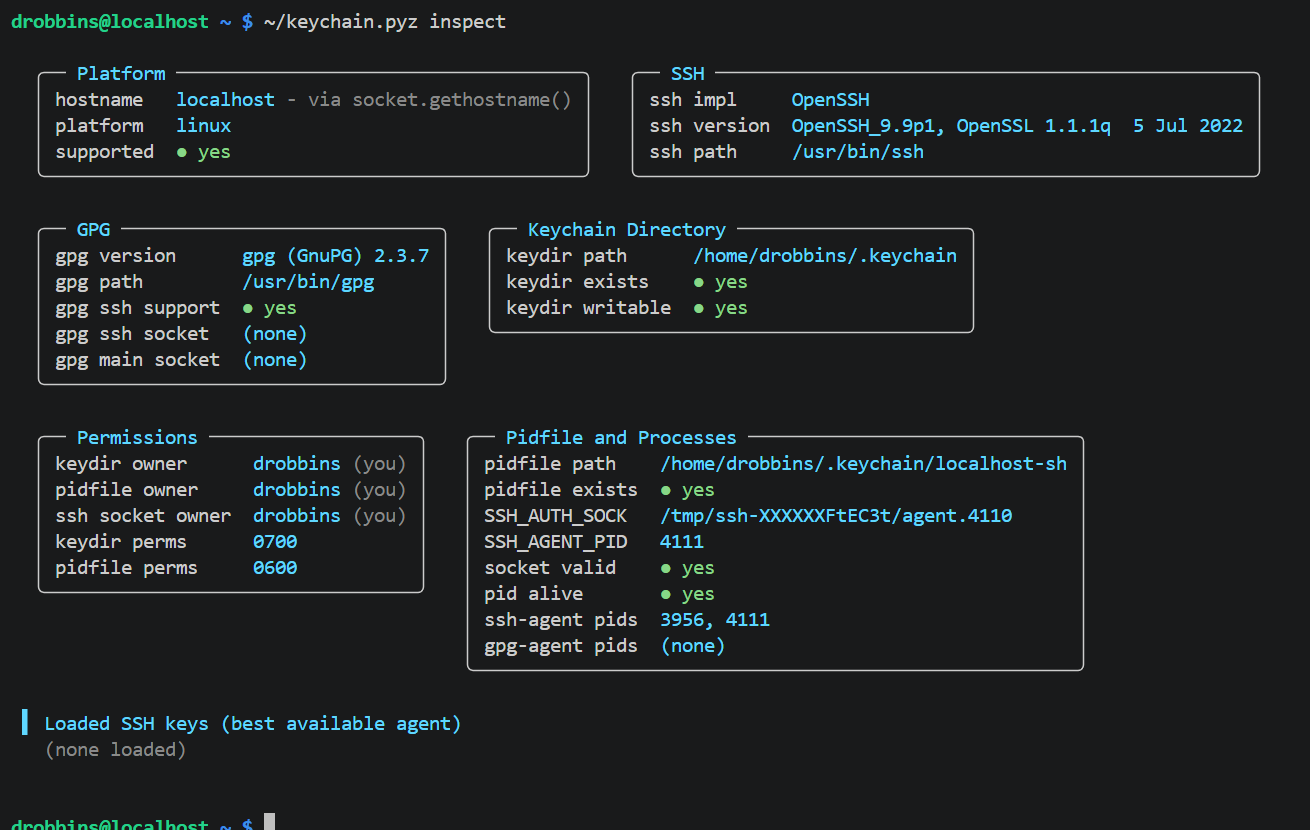
This should make troubleshooting agent issues far less mysterious. Instead of guessing which agent is active or where the socket came from, you can ask Keychain what it is actually seeing.
Explaining an invocation
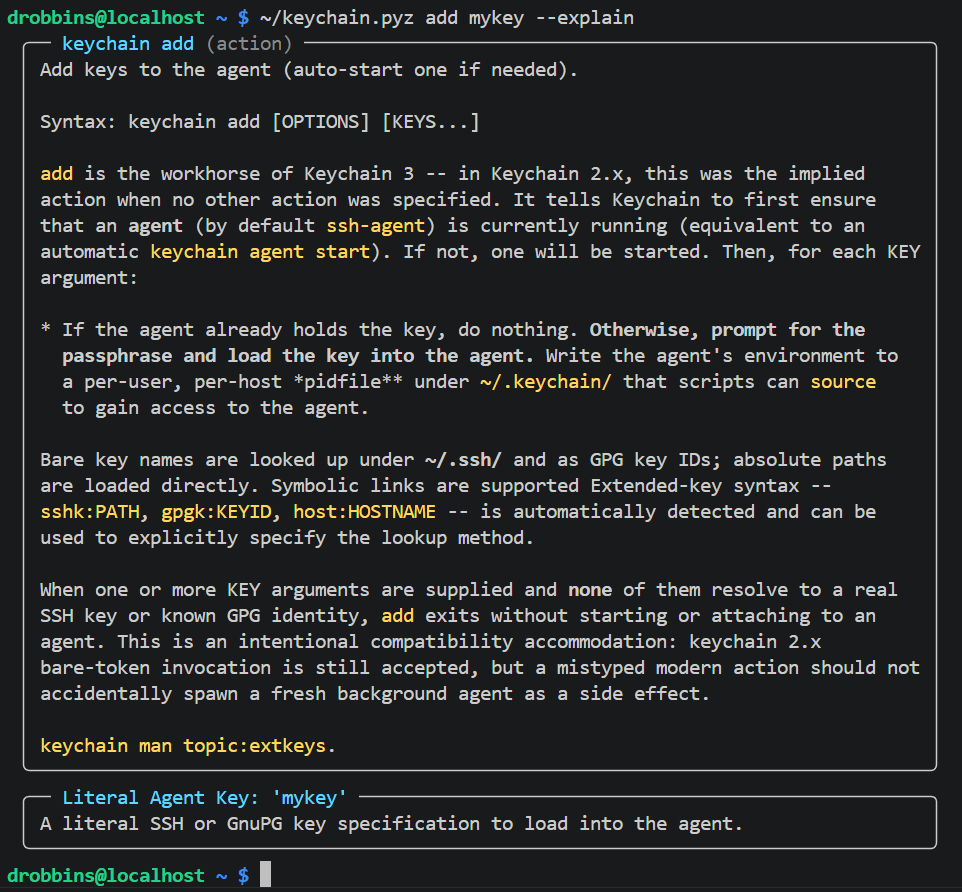
Keychain 3 also adds --explain. Add it to a command line and Keychain will
show the relevant documentation for the exact invocation you are specifying,
including how it understands the arguments.
Why Python?
The move from shell to Python was deliberate. The 2.x implementation was a single POSIX shell script, which was wonderful for deployment but increasingly difficult to maintain, test, and audit with confidence.
Python gives Keychain a more capable runtime for paths, subprocesses, environment handling, structured parsing, and platform behavior while preserving the operational simplicity that made the original script useful. I have a more detailed write-up for those who want the full rationale:
Keychain is moving again
I have continued working on Keychain 3 today, closing old issues, improving the test coverage, tightening CI, and polishing the documentation. Keychain is moving forward again.
Try it
Download the .pyz file from the release page and run it directly:
$ chmod +x keychain-3.0.0_beta1.pyz
$ ./keychain-3.0.0_beta1.pyz inspect
For a system install, copy the .pyz into your path and rename it to
keychain:
$ sudo cp keychain-3.0.0_beta1.pyz /usr/local/bin/keychain
$ sudo chmod 755 /usr/local/bin/keychain
$ keychain inspect
Please give Keychain 3.0.0_beta1 a whirl. If you find issues, report them on the GitHub issue tracker: